
Past work · R&D studio

Applied Minds

2.5D terrain systems, touch tables, and early in-vehicle UX — fabrication meets spatial intelligence.

Context
Advanced R&D studio — defense, automotive, aerospace, and immersive UX systems
Role
Industrial fabricator · UX/UI pioneer · Human-factors specialist
Timeline
2004 – 2008
Personal note

I helped build early multisensory interfaces for defense, aerospace, and automotive OEMs—combining hardware fabrication, UX innovation, and human-factors research. From 2.5D terrain systems to in-vehicle navigation concepts, I bridged physical and digital workflows to prototype high-stakes tools years before they became industry standards.

01

Foundations

Early multimodal UX across defense & automotive

Discovery & program framing

  • Human-factors research — Mapped reach, visibility, cognitive load, and situational-awareness requirements for high-risk environments.
  • Hardware–software integration — Built prototypes blending physical controls, custom electronics, and interactive UI.
  • Cross-disciplinary workflow — Partnered with engineers, researchers, and storytellers to shape concepts rapidly.
  • Innovation groundwork — Established early interaction models that later informed modern automotive and defense UI patterns.

02

Terrain, TouchTable & Automotive UI

Designing tactile & spatial intelligence tools

Fabrication, collaboration surfaces, and early in-cabin interaction

Project · 2.5D terrain table

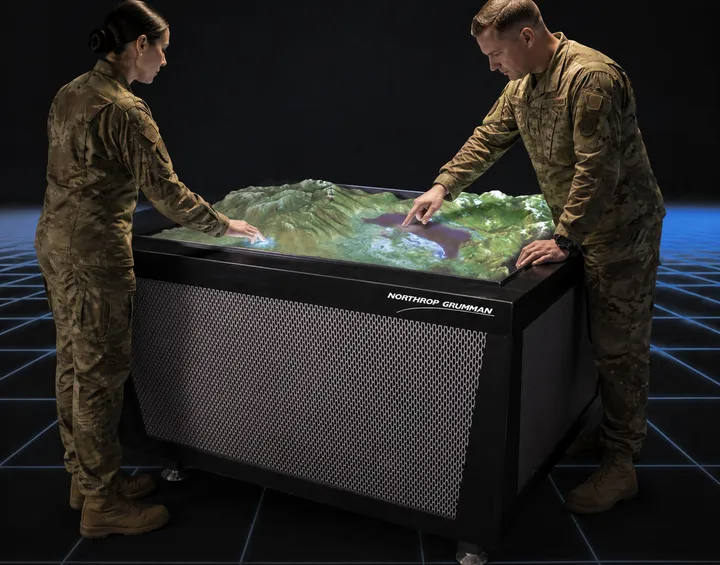
Pin-grid elevation driven by real geospatial data—touch-controlled focus, shift, and live terrain readouts for teams who needed geography without relying on language alone.

2.5D terrain table

I helped fabricate a 2.5D terrain table that used a touch interface to control more than 3,500 motorized pins, each responding to real geospatial data. Selecting a location triggered the table to shift, focus, and render elevation changes in real time. The system allowed teams to interpret complex terrain without relying on language, enabling rapid, intuitive geographic analysis.

  • 2.5D terrain table — Fabricated a pin-grid elevation system driven by geospatial data, enabling tactile map exploration.
  • Touch-enabled menus — Implemented a multi-user touch interface for navigating, zooming, and interpreting terrain features.
  • Geospatial visualization — Designed interaction patterns to make complex elevation and topographical data more intuitive.
  • Collaborative analysis — Enabled teams to explore and communicate geographic intelligence without technical barriers.

Project · TouchTable

Workshop-built multi-user surfaces for large information spaces—networkable so distributed teams could share one virtual workspace.

TouchTable

As an industrial fabricator at AMI, I built these tables from scratch in the workshop. The TouchTable is an advanced system where multiple users can visualize, navigate, and analyze large amounts of information. Two or more TouchTables can be networked, allowing people in different locations to work together in a common virtual space.

Project · Automotive UI

Early in-cabin touch and Flash-era flows—navigation, personalization, and gesture experiments under real NHTSA pressure, without relying on hero renders.

Automotive IP

Prototyping navigation & personalization before smartphones

Early in-vehicle touch and Flash-era interaction—scoped to NHTSA constraints while still pushing navigation, personalization, and low-fidelity gesture experiments. Scan the cards for the thesis; open Full brief when you want the deeper program notes (no hero imagery for this line—prototype packs lived in Flash and review rooms).

Navigation concepts

Touch-screen automotive navigation with predictive address entry and side-rollout menus.

Full brief

GM engaged us to design a new navigation experience for an 8-inch round display. With almost no precedent for touch in the cabin, we used side-rollout menus to pack navigation, points of interest, and personalization hooks into brutal real estate—prioritizing glanceability and reach for the driver while keeping flows legible in early Flash builds.

Driver safety models

Interaction patterns tuned to strict NHTSA limits—fewer taps, less visual noise, less cognitive load.

Full brief

In 2003, regulators capped how much typing drivers could do before lockout—often as few as nine keystrokes for address entry. We prototyped workarounds in Flash that respected those ceilings while still demonstrating usable destination flows, keeping distraction budgets explicit in every review.

Personalization systems

Presets, themes, and multi-driver profiles years before those patterns were mainstream in phones.

Full brief

Some of the first production touch surfaces lived in cars with narrow feature sets. We explored how wallpapers, saved layouts, and driver-specific presets could make shared vehicles feel less hostile—pairing personalization with the navigation and media stacks so the HMI felt coherent, not bolted on.

Digital interaction experiments

Flash prototypes for dials, menus, and gesture patterns—fast to iterate, honest about fidelity.

Full brief

Low-fidelity motion studies let us test virtual dials, radial menus, and gesture affordances before hardware caught up. One thread looked at how dial-based controls could streamline media tasks (for example, song selection) while staying legible at arm’s length—useful for crits with HMI and engineering even when the visuals were deliberately rough.

03

Delivery & outcomes

What shipped — terrain, TouchTable, and GM navigation

Build-ready hardware, touch layers, and in-vehicle prototype packs

Work moved past slideware into runnable builds and shop-floor systems teams could hand to engineering and fabrication. Terrain, TouchTable, and Automotive UI are covered above as separate projects; this section closes the loop on GM in-vehicle IP (no imagery retained) and maps each program line to what was actually delivered.

By program line

2.5D terrain table

What was delivered

Fabricated physical system
Workshop-built table integrating a motorized pin field (3,500+ actuators) with real geospatial elevation data—not a render, but a tactile surface teams could run scenarios on.
Touch-driven control layer
Multi-touch UI for selection, camera/focus shifts, and live elevation updates so analysts could work the model without a separate operator console.

TouchTable

What was delivered

Custom-built tables
In-house fabrication (frame, integration, finish) as production-minded prototypes—not one-off props—so the experience matched what a fielded product would feel like.
Multi-user + multi-site collaboration
Networked mode where two or more tables shared a common virtual workspace for distributed review of the same dataset and annotations.

GM navigation & in-vehicle IP

What was delivered

8″ navigation + menu system
Touch-first navigation for a small round display—side-rollout menus, POI flows, and personalization hooks sized to extreme real-estate constraints.
NHTSA-bounded interaction prototypes
Flash simulations that respected early lockout rules (e.g., limited keystroke entry) and demonstrated predictive address entry and other workarounds for legal and HMI review.